확장할 수 있는 데이터 추출 서비스 구축 경험 공유
파트너 플랫폼 데이터 추출 서비스를 공유합니다.
빅토르
Back-end Engineer
안녕하세요. 파트너 플랫폼 스쿼드에서 백엔드 개발을 담당하는 빅토르입니다.
파트너 오피스를 운영하면서 이슈가 되었던, 엑셀 다운로드 기능 개선 경험에 대해서 공유해 보겠습니다.
🔥 데이터 추출 서비스
많은 기능 중 고객사가 자주 사용하는 데이터 추출 ( 엑셀 ) 기능은 데이터와 항목이 다양해짐에 따라 추출은 무겁고 느려졌습니다.
저희 팀은 파트너사에게 좋은 경험을 제공하고자 이 부분을 적극 개선해 보았습니다.
진행하면서 고민했던 부분
- 데이터 추출 요청을 어떻게 하면 제어할 수 있을까?
- 데이터 추출 속도를 어떻게 하면 높일 수 있을까?
- 스프링 배치 실행 방법은 스케줄, 실행 중 어느 방법이 우리에게 맞을까?
😅 현재의 문제는 아래와 같습니다.
- 많은 양의 데이터를 데이터베이스에 요청을 하게 되면, 사용자는 데이터베이스의 응답이 끝날 때까지 브라우저에서 로딩바만 바라보고 있었음
- 데이터 추출까지 화면에서 대기해야 하며, 브라우저를 종료하면 당연히 다운로드는 멈춤
- 테이블이 많거나, 양이 많은 데이터를 가져와야 하는 상황이 종종 발생해서 서버 자원이 부족한 상황을 초래
- 더 큰 문제는 동기적인 방식의 구조라서 다수의 요청이 들어오게 되면 백엔드 서비스도 부하가 발생
🤔 우리는 이렇게 해결할 계획입니다.
- 브라우저를 닫아도 신청한 데이터 추출은 백엔드에서 처리
- Kafka 이벤트를 발생/ 관리하여 데이터 추출 서비스에서 자료를 생성하고, 재사용이 가능하도록 재 다운로드 기능도 제공
- 백엔드 서버와 엑셀 생성 서버를 분리
- 백엔드와 분리된 데이터 추출 서비스를 생성
- 비동기 이벤트를 발생하여 엑셀 생성에 부하가 없도록 관리
- 이벤트를 관리하여 데이터 추출 서비스가 안정하게 동작하도록 관리
그래서 비동기 방식을 가진, 안정적인 서비스를 제공하기 위해 다음과 같은 3가지의 방법을 적용해 보았습니다.
- 첫째 비동기로 된 응답 프로세스를 구현
- 둘째 데이터베이스로부터 받은 데이터를 엑셀로 만들어줄 서비스를 별도 생성하여 기존 서버의 로드를 분산
- 마지막으로 데이터 추출에 유리한 SpringBatch를 사용
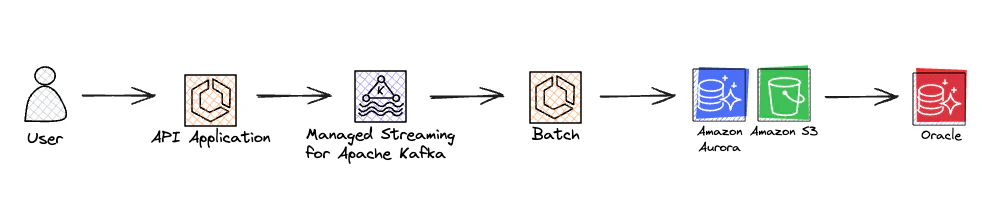
시스템 흐름도
- API Application
- 유저가 요청할 때 API Application에서 중복 요청을 방지하여 로드를 낮춤.
- Kafka
- 엑셀 생성 이벤트를 전달하는 부하 분산 브로커를 도입.
- Batch
- 엑셀, json 등 원하는 추출 타입을 만들어 줌.
- S3
- S3에 업로드된 엑셀은 언제든지 재 다운로드 가능
😮 SpringBatch
SpringBatch는 다음과 같은 Job 을 갖습니다.
- Job에는 다양한 Step 이 존재
- Job이 시작하거나 끝날 때 listener를 설정하여 실행
- 개발자는 Step만 적절히 등록하면 되는 장점
- 멀티 스레드, Spring Bean 들을 그대로 사용
@Bean
public Job partitionJob() {
  return jobBuilderFactory.get("partitionJob")
      .incrementer(new UniqueRunIdIncrementer())
      .start(totalCountTasklet)
      .next(partitionMainStep)
      .next(excelMergeTasklet)
      .next(s3UploadTasklet)
      .listener(excelJobListener)
      .build();
}

@Bean
public Step s3UploadTasklet() {
    return stepBuilderFactory.get("s3UploadTasklet")
    .tasklet(s3UploadTasklet)
    .build();
}
JobExecutionListener는 아래와 같이 사용하였습니다.
- beforeJob 행위로 Job 실행전 임시 폴더를 생성
- afterJob 행위로 Job이 종료되었을때 정상 / 비정상에 따라 이벤트를 구분하여 상태를 기록
@Slf4j
@Component
@RequiredArgsConstructor
public class ExcelJobListener implements JobExecutionListener {

  private final ExcelJobService excelJobService;

  private final FileService fileService;

  private String tempFilePath;

  @Override
  public void beforeJob(JobExecution jobExecution) {

    fileService.createFile();
  }

  @Override
  public void afterJob(JobExecution jobExecution) {

    ExecutionContext executionContext = jobExecution.getExecutionContext();
    ExportEvent exportEvent = (ExportEvent) executionContext.get(EVENT);
    FileInfo fileInfo = (FileInfo) executionContext.get(FILE_INFO);

    if (jobExecution.getStatus() == BatchStatus.COMPLETED) {
      excelJobService.sendSuccessEvent(exportEvent, fileInfo);
      return;
    }

    excelJobService.sendFailedEvent(jobExecution, exportEvent);
  }
}
- SpringBatch를 사용한 데이터 추출 방식은 병렬처리하였습니다.
- 아래 4가지가 존재합니다.
- Multi-threaded Step
- Parallel Steps
- Remote Chunking
- Partitioning
데이터 추출 서비스는 아래의 이유로 Partitioning 사용하였습니다.
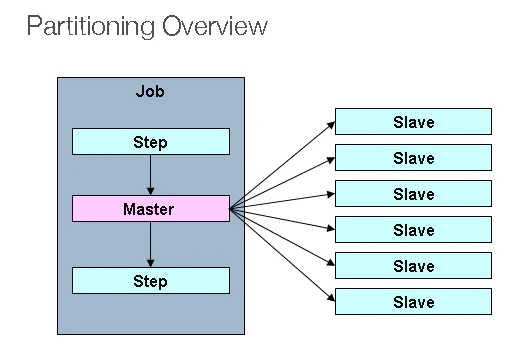
- 하나의 데이터 추출 요청에 하나의 Job 이 실행되고, 다수의 Partitioning 작업이 진행되어 엑셀을 생성하는데 효율적임
- 여러 엑셀 파일을 만들고, 최종적으로 한 개로 병합 작업 방식을 채택
- Partitioning은 하나의 Job에서 다수의 Secondary를 생성
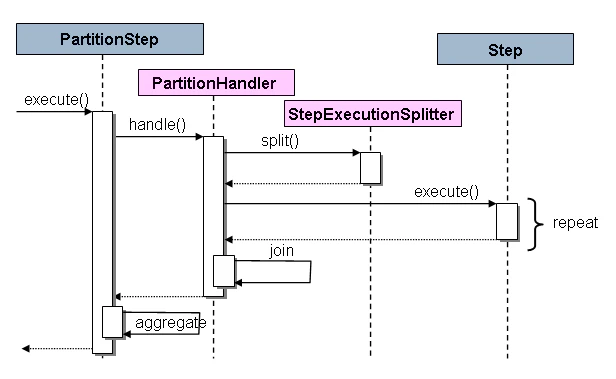
- PartitionStep의 동작 방식
- 내부적으로 Step을 분할하여 반복 실행하도록 실행되는 구조
- PartitionStep 코드는 아래와 같이 작성
- PartitionStepBuilder 객체를 통해서 PartitionStep를 생성
@Bean
public Step partitionMainStep() {
  return stepBuilderFactory.get("partitionMainStep")
      .partitioner("subStep", partitioner(null, null, null)) // partitioner 사이즈 및 옵션 부여
      .step(partitionSubStep())  // step 분할 repeat 대상
      .taskExecutor(taskExecutor) // 동기 or 비동기, task 옵션 설정
      .build();
}
아래는 PartitionStep 을 생성할 때 PartitionStepBuilder의 build()를 호출하여 객체를 생성하게 됩니다.
public Step build() {
 PartitionStep step = new PartitionStep();
 step.setName(getName());
 super.enhance(step);

 if (partitionHandler != null) {
  step.setPartitionHandler(partitionHandler);
 }
 else {
  TaskExecutorPartitionHandler partitionHandler = new TaskExecutorPartitionHandler();
  partitionHandler.setStep(this.step);
  if (taskExecutor == null) {
   taskExecutor = new SyncTaskExecutor();
  }
  partitionHandler.setGridSize(gridSize);
  partitionHandler.setTaskExecutor(taskExecutor);
  step.setPartitionHandler(partitionHandler);
 }

 if (splitter != null) {
  step.setStepExecutionSplitter(splitter);
 }
 else {

  boolean allowStartIfComplete = isAllowStartIfComplete();
  String name = stepName;
  if (this.step != null) {
   try {
    allowStartIfComplete = this.step.isAllowStartIfComplete();
    name = this.step.getName();
   }
   catch (Exception e) {
    if (logger.isInfoEnabled()) {
     logger.info("Ignored exception from step asking for name and allowStartIfComplete flag. "
       + "Using default from enclosing PartitionStep (" + name + "," + allowStartIfComplete + ").");
    }
   }
  }
  SimpleStepExecutionSplitter splitter = new SimpleStepExecutionSplitter();
  splitter.setPartitioner(partitioner);
  splitter.setJobRepository(getJobRepository());
  splitter.setAllowStartIfComplete(allowStartIfComplete);
  splitter.setStepName(name);
  this.splitter = splitter;
  step.setStepExecutionSplitter(splitter);

 }

 if (aggregator != null) {
  step.setStepExecutionAggregator(aggregator);
 }

 try {
  step.afterPropertiesSet();
 }
 catch (Exception e) {
  throw new StepBuilderException(e);
 }

 return step;

}
아래 PartitionStep Execute를 실행하여 진행하게 되구요.
protected void doExecute(StepExecution stepExecution) throws Exception {

 if(hasReducer) {
  reducer.beginPartitionedStep();
 }

 // Wait for task completion and then aggregate the results
 Collection<StepExecution> stepExecutions = getPartitionHandler().handle(null, stepExecution);
 stepExecution.upgradeStatus(BatchStatus.COMPLETED);
 stepExecutionAggregator.aggregate(stepExecution, stepExecutions);

 if (stepExecution.getStatus().isUnsuccessful()) {
  if (hasReducer) {
   reducer.rollbackPartitionedStep();
   reducer.afterPartitionedStepCompletion(PartitionStatus.ROLLBACK);
  }
  throw new JobExecutionException("Partition handler returned an unsuccessful step");
 }

 if (hasReducer) {
  reducer.beforePartitionedStepCompletion();
  reducer.afterPartitionedStepCompletion(PartitionStatus.COMMIT);
 }
}
🤠 다음은 Batch 호출 방법을 설명하겠습니다.
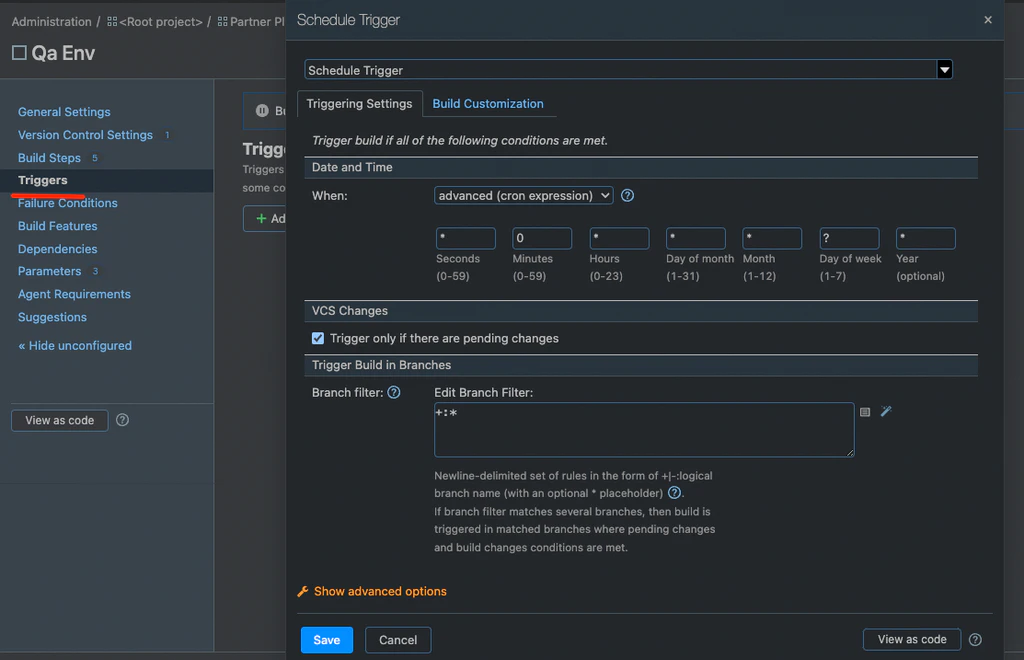
1. 시스템 ( TeamCity ) - 서버 원격 호출
TeamCity Trigger를 등록
아래는 0분마다 spring-batch.jar 을 실행하는 Build에 대한 내용
- Schedule Trigger 0분마다 Build 하는 스케줄
- 원격 실행할 수 있는 스크립트 작성
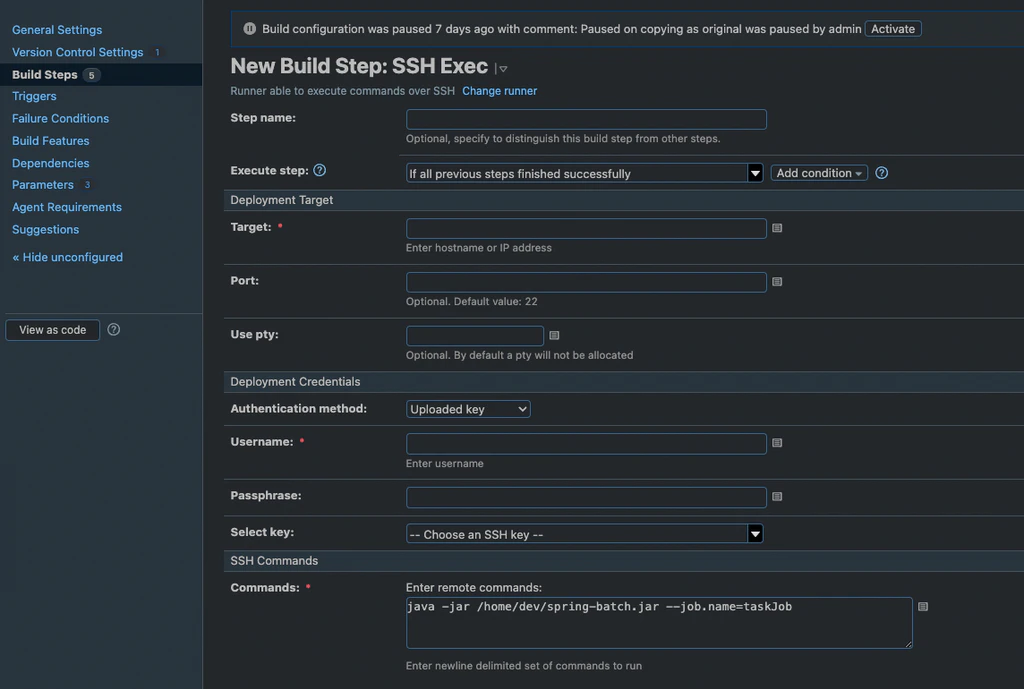
2. 스케줄러 사용 ( crontab ) - 서버 직접 등록
linux의 crontab -l, e, r 등 명령어로 스케줄 등록
아래는 0분마다 spring-batch.jar 을 실행하는 스케줄

3. Kafka Consume - 이벤트 호출
kafka의 이벤트가 발행되었을 때마다 consume
배치의 실행은 스케줄러가 아닌 이벤트 의해 트리거
- @KafkaListener를 사용하여, Consume 하도록 설정
@KafkaListener(
    topics = "${spring.kafka.topic}",
    clientIdPrefix = "${spring.kafka.topic.client-id}"
)
public void batchConsumer() throws JobInstanceAlreadyCompleteException, JobExecutionAlreadyRunningException, JobParametersInvalidException, JobRestartException, JsonProcessingException {

  createJobLauncher.run(partitionJob,
        new JobParametersBuilder()
            .toJobParameters()
    );
}
🙂 마무리
스프링 배치를 스케줄러 방식 보다 이벤트 방식으로 사용하게 되면서,
이벤트 방식은 어떻게 사용을 해야 하는지, 또 구조는 어떻게 설계해야 하는지 등을 알게 되는 경험이었습니다.
또한, 레거시의 기능을 보다 안전하게 운영하기 위한 방법에 대해 고민할 수 있는 시간이기도 했습니다.
그럼 여기까지 제 경험을 공유하고 이만 마무리해보겠습니다.
읽어 주셔서 감사합니다.
Architect. 코드다이버
References
https://docs.spring.io/spring-batch/docs/current/reference/html/scalability.html#partitioning
올리브영 테크 블로그는 구성원들이 진심을 담아 손수 작성하고 있습니다